


CarHome Ultra Unlocker
4.0423.00 Reviews
App Specs
- Version
- 1.7
- Updated On
- License
- $19.99
- Downloads
- 50,000+
- Developer
- TheSpinningHead
- Categories
- Auto & Vehicles
- Platform
- Android
Screenshots
 Analysis by AppCompare
CarHome Ultra Unlocker is a paid Android utility built around a simple driving problem: a phone is useful in a car, but ordinary phone menus are not always comfortable or safe to operate while seated behind the wheel. I looked at it as an everyday car companion rather than as a general phone launcher, and that distinction matters. Its purpose is to put the functions I am most likely to need on a clearer, more vehicle-friendly screen, with less searching through standard Android menus.
The app belongs to the Auto & Vehicles category and comes from TheSpinningHead. It is listed at $19.99, carries an Everyone age rating, and has a 4.0 average from around two thousand ratings. That combination tells me this is a focused tool with a fairly specific audience: drivers who want a dedicated car interface and are willing to pay for it instead of relying on the phone’s normal home screen.
I would not describe it as a complete replacement for every modern in-car system. Its value is more practical and direct. It gives an older Android phone or a spare device a clearer role in the vehicle, especially when the driver wants quick access to music and basic phone management without navigating a crowded launcher. The experience is most convincing when the phone is mounted in a fixed position and CarHome Ultra Unlocker is treated as the starting point for a journey.
How the interface feels from the driver’s seat
When I judge a car interface, I pay attention to more than whether its controls look large: I ask whether the screen helps me find the right task without inviting extra fiddling. Here, I’ll focus on how the dock layout changes that moment of recognition, especially when the phone is mounted at a fixed angle. That also sets up a closer look at how the same layout shapes music and phone use during an ordinary trip.
Readability and navigation at a glance
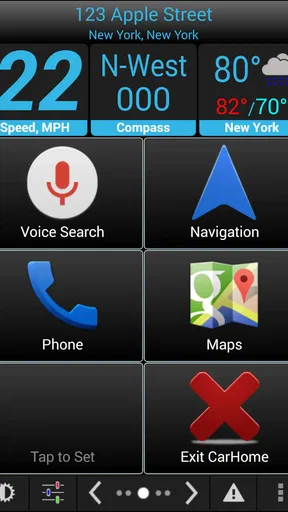
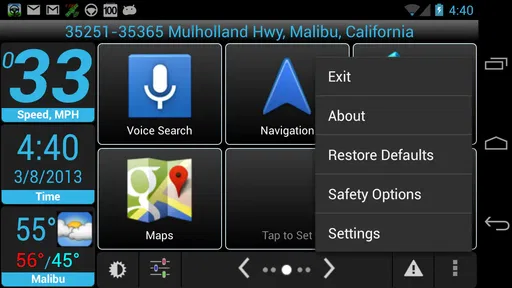
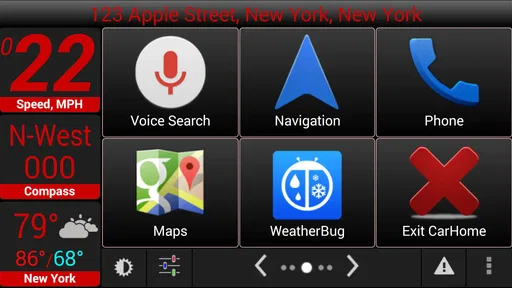
The central idea is the car dock interface: a screen arranged for use in a vehicle rather than for browsing apps at a desk. In my experience, that change in context is more important than it first appears. A conventional Android home screen may be familiar, but it often makes the driver look for small icons, swipe between pages, or remember where a particular shortcut was placed. A dedicated car layout reduces that mental work.
That is especially helpful when I am parked at the curb and preparing to leave. Instead of opening the regular launcher, finding a music app, and then returning to navigation, I can begin from a screen designed around driving-related tasks. The benefit is not that every action becomes automatic; it is that the starting point is less cluttered and easier to understand under time pressure.
For people with reduced visual attention, reading difficulty, or trouble distinguishing small interface elements, a vehicle-focused layout can be more comfortable than a standard phone desktop. Large, clearly separated controls are easier to identify with a brief glance. I would still advise setting up the phone while stationary, because a readable interface is not permission to interact with the screen continuously on the road.
Worth Reading Before You Choose

EA SPORTS FC Mobile 26 Is a Bigger Football Game, but It Takes Time

Flipboard Shows What News Apps Must Do Beyond the Feed

Switching to Android Auto Means Rethinking Your Driving Routine

Google Calendar Makes a Crowded Week Easier to Manage

Ludo King Makes the Most of the Minutes Between Plans

Baby Panda World Brings Quick Play to Modern Phones, but Its Game Library Feels Busy
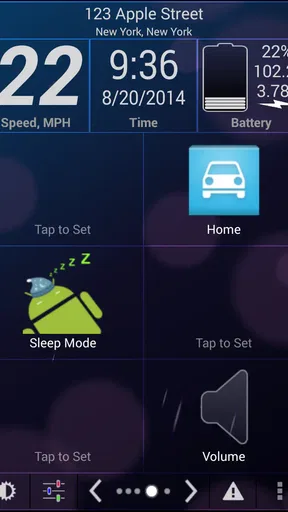
One useful habit is to keep the dock screen limited to the actions I actually use during a drive. If I turn it into another crowded collection of shortcuts, I lose the main advantage. The best setup is deliberately boring: music, communication, and the phone functions that genuinely matter in the car. This is a small but important trade-off. The app can simplify access, but the driver still has to make sensible choices about what remains visible.
The interface also makes more sense when the device stays in the same mount. Moving the phone from a dashboard mount to a cup holder or hand-held position changes the viewing angle and can make any car launcher less useful. I found that the app works best as a stable dashboard surface, not as something I open only after the trip has already started.
Music control without turning the phone into a distraction
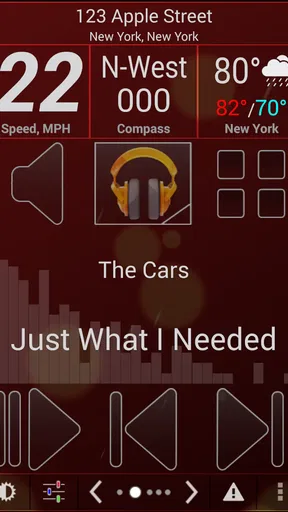
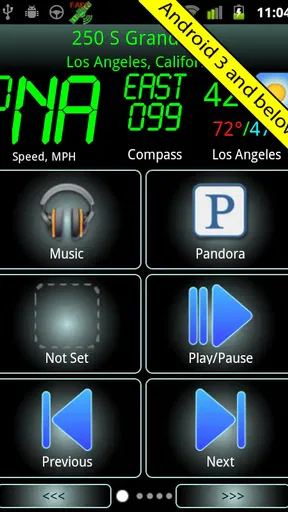
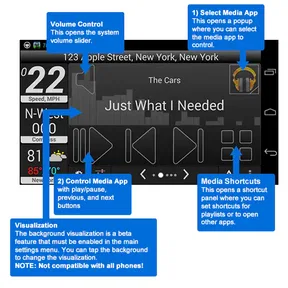
Music is one of the strongest reasons to use this app. A driver often wants to start a playlist, pause audio, or change what is playing, but the normal route through a phone can involve several small targets and multiple screens. CarHome Ultra Unlocker brings that activity into the same driving-oriented environment as the rest of the phone controls.
The practical advantage is consistency. I do not have to remember whether the music control is on the lock screen, inside a particular player, or hidden behind a notification. When I use the app as the car’s front door, audio becomes part of one predictable workflow. That can be useful for someone who finds frequent app switching tiring or confusing.
There is also a less obvious benefit for passengers. A passenger can understand the layout quickly and help select audio without needing to learn the entire phone. That makes the app useful in shared vehicles, particularly when the driver wants to keep their own interaction to a minimum. I would still avoid treating the screen as a passenger entertainment panel while driving; its strongest role is reducing the driver’s need to search.
The limitation is that this is not the same as having a dedicated physical control system. Touch targets may be easier to see than ordinary phone icons, but they are still touch targets. If tactile buttons, steering-wheel controls, or voice commands are essential for you, a vehicle system built around those methods may be a better fit. CarHome Ultra Unlocker improves the phone interface; it does not turn a touchscreen into a set of physical controls.
Motor and sensory considerations
From a motor-access perspective, the app’s main strength is reducing fine navigation. A driver with limited dexterity may prefer a small number of prominent actions over a dense Android desktop full of tiny icons. A person who has difficulty with precise swipes can also benefit from starting with a straightforward dock rather than moving through several launcher pages.
That said, I would not overstate the accessibility benefit. The app does not remove the need for accurate touch input, and I would not recommend it as a solution for someone who cannot safely reach or operate a mounted touchscreen. Its usefulness depends on the phone, the mount, the screen size, and the user’s own movement range. A large, stable display may be comfortable for one driver and awkward for another.
For sensory needs, a calmer layout can reduce visual overload. A standard home screen may show unrelated notifications, colorful icons, and changing content. A dedicated car surface gives the phone a narrower purpose, which can make it easier to understand at a glance. I find this particularly helpful when driving at night or in unfamiliar surroundings, when attention is already divided.
There are boundaries here as well. A simpler screen does not guarantee that every element will suit a person with low vision, light sensitivity, color-vision differences, or a need for spoken feedback. I would test the app in the parked car during daylight and after dark, then check whether the text and controls remain comfortable at the actual mounting distance. If the display causes squinting or repeated leaning forward, the problem is the overall setup, not merely the launcher.
Another practical tip is to prepare audio and communication before moving. This is more than a safety reminder: it is the best way to get value from the interface. The app can make a task easier to locate, but it cannot make an unsafe moment safe. A passenger, voice control, or a vehicle’s built-in controls may be preferable when the driver needs to avoid touching the screen altogether.
Situational access in everyday driving
A realistic use case is an older Android phone kept permanently in the car. I can mount it, connect the audio in the way my vehicle supports, open the car interface, and leave the regular phone clutter behind. That arrangement gives the device a clear job and can be more convenient than repeatedly mounting my main phone and reorganizing its screen for every trip.
This also suits drivers who use a vehicle without a modern infotainment display. The app provides a more intentional front end for phone-based driving tasks than the default launcher. It is not a replacement for a built-in system, but it can make an older dashboard feel less dependent on a general-purpose phone interface.
It may also help in situations where a driver shares a car with family members. A consistent dock screen means the next person does not need to search through a personal home screen filled with unrelated apps. For users who are easily disoriented by changing layouts, keeping the same phone and same screen position can make the routine more predictable.
The app’s low minimum operating-system requirement is notable because it makes the product relevant to older Android hardware. It supports devices dating back to Android 1.6, while the current version is 1.7. That does not mean every old handset will be pleasant to use today, but it does explain why this utility can appeal to people repurposing an older phone rather than buying a new dashboard unit.
There is a trade-off in using older hardware. A dated phone may have a smaller or dimmer display, slower response, weaker battery life, or less convenient connectivity than a current device. The launcher can organize the experience, but it cannot modernize the hardware. I would judge the complete setup, including the mount and audio connection, rather than deciding from the app alone.
Where the experience still creates barriers
The first barrier is the price. At $19.99, this is not an impulse download for a simple launcher. I can understand the cost for someone who uses a dedicated car phone every day, but occasional drivers may find the purchase difficult to justify when their phone already offers a basic driving mode or when a free launcher can provide large shortcuts.
The second barrier is the age of the product. CarHome Ultra Unlocker was released on March 25, 2011, and its current version is 1.7. Those details do not automatically make it unusable, but they should shape expectations. Someone looking for a current interface, deep integration with newer vehicle systems, or contemporary accessibility options may be happier with a newer alternative.
Compared with a built-in infotainment system, this app is more flexible but less integrated. A factory system may offer physical controls, a larger display, vehicle audio integration, and a design intended specifically for the car. Compared with a modern phone driving mode, CarHome Ultra Unlocker is more dedicated and potentially easier to keep consistent, but it may feel less current and less connected to newer phone features.
Compared with a free car launcher, the paid version needs to earn its place through the complete experience rather than through the basic idea of large shortcuts. If all I need is a few icons on a dashboard, a free option may be enough. The paid purchase becomes easier to defend when I want a purpose-built dock screen and expect to use the setup regularly.
There is also a learning barrier for anyone who expects the app to configure the whole car automatically. I would not approach it as a one-tap replacement for pairing, mounting, audio selection, and phone setup. The useful workflow is to prepare those pieces in advance, decide which actions belong on the car screen, and then leave the interface stable. Users who want everything to happen without setup may find the experience too hands-on.
Privacy and distraction concerns deserve a practical mention. A car launcher places communication and media close together, which is convenient but can encourage unnecessary interaction. I would use it with the same discipline as any other phone-based dashboard: set destinations and choose audio before departure, use a passenger for changes when possible, and pull over for anything that requires concentration.
Who should use it, and who should skip it
I think the app is a good match for someone who owns an older Android phone, drives regularly, and wants a stable car-focused home screen instead of a general launcher. It is also worth considering for drivers who find ordinary phone layouts visually busy or physically awkward, provided they can comfortably reach and read the mounted device.
It makes less sense for someone who already has a strong built-in infotainment system and rarely touches the phone in the car. I would also hesitate to recommend it to a person who depends on voice-first access, tactile controls, or very specific modern accessibility support. In those cases, a vehicle system or newer phone platform designed around those needs may be the safer and more suitable choice.
The purchase decision should be based on frequency. If I drive every day and the app replaces repeated searching through the phone, the one-time price can feel reasonable. If I drive only occasionally, the same cost may outweigh the convenience. The roughly fifty thousand installs show that it has found a real audience, but popularity alone does not make a dedicated dock necessary for every driver.
My inclusive verdict after using it as a car interface
CarHome Ultra Unlocker succeeds because it understands one narrow context: a phone mounted in a vehicle should not look like a normal phone. Its clearer driving-oriented presentation can support easier visual scanning, fewer navigation steps, and a more predictable routine for music and phone management. For some users, that consistency is more valuable than a long list of advanced features.
My recommendation comes with conditions. I would set it up while parked, test the screen from the real driving position, keep the visible actions limited, and use a passenger or voice control whenever possible. I would also compare the total cost with a free launcher, a newer driving mode, and the controls already available in the car.
In the end, I see it as a specialized purchase rather than an essential Android app. Its strongest accessibility quality is contextual simplicity, not a promise of universal access. If that simplicity matches the way you drive, the app can make an older phone feel purpose-built and less distracting to navigate. If you need modern integration, tactile operation, or broad hands-free support, I would choose a different solution instead. For the right driver, though, CarHome Ultra Unlocker remains a focused way to turn a spare Android device into a more readable and manageable car companion.
Pros
- Unlocks the full CarHome Ultra feature set after installation.
- Provides a driving-focused interface with large
- easy-to-tap controls.
- Supports customizable shortcuts for navigation
- contacts
- and media.
- Useful for mounting an Android phone as a dedicated in-car dashboard.
- Works well with compatible Android devices and existing CarHome Ultra setups.
Cons
- Designed for Android and not available for iPhone or iPad.
- Requires the main CarHome Ultra app to be installed separately.
- Compatibility may vary with newer Android versions and device screen sizes.
- Unlocker functionality offers little value without the companion application.
- Some advanced car integrations may depend on the phone
- ROM
- or vehicle setup.
FAQs for CarHome Ultra Unlocker
What is CarHome Ultra Unlocker, and what does it do?
CarHome Ultra Unlocker is the license component for CarHome Ultra, an Android app designed to provide a simplified driving interface. It can unlock the full version of the main app, giving access to features such as customizable shortcuts, large on-screen buttons, vehicle information, navigation links, and driving-focused tools. The unlocker generally works together with the installed CarHome Ultra application rather than functioning as a standalone dashboard.
Is CarHome Ultra Unlocker compatible with every Android phone and vehicle?
Compatibility depends mainly on your Android version, device hardware, screen layout, and the way your phone connects to your vehicle. The unlocker is intended for Android devices, but some features may require GPS, Bluetooth, a car dock, Android Auto-related accessories, or compatible vehicle systems. Before downloading, check the app listing and your phone settings, especially if you use a newer Android release or a manufacturer-specific interface.
Does CarHome Ultra Unlocker require an internet connection or a subscription?
The unlocker is typically purchased as a one-time license rather than a recurring subscription, although the exact price and purchase conditions can vary by store or region. An internet connection may be needed when downloading the application, verifying the license, or accessing online services such as maps and weather. Once activated, many dashboard and shortcut functions can usually be used offline, depending on the feature involved.
What permissions does CarHome Ultra Unlocker or CarHome Ultra need?
Because CarHome Ultra is intended for use while driving, it may request permissions related to location, Bluetooth, phone status, notifications, and storage or media access. These permissions can support navigation shortcuts, GPS information, connected-device features, and hands-free operation. You should review each permission carefully and grant only what you are comfortable with. Some functions may not work correctly if essential permissions are denied.
Is CarHome Ultra Unlocker safe to use while driving?
CarHome Ultra Unlocker can help create a clearer, larger, and more accessible dashboard interface, but it does not make phone use while driving automatically safe or legal. Drivers should configure shortcuts and settings before starting a journey and avoid typing, browsing, or handling the phone in motion. Always follow local traffic laws, use a secure mount, and rely on voice controls or hands-free features whenever possible.


